
Bluetooth accessory not connecting to iPhone
Bluetooth pairing failures often come from the accessory not being in discovery mode, low power, stale pairing data, another device holding the connection, or app-level Bluetooth permission. Apple recommends accessory power/proximity and re-pairing before treating the iPhone radio as failed.
Restore accessory discovery and pairing
Put the accessory in discovery mode, make sure it is charged and nearby, then unpair and pair it again. If it is paired to another device, disconnect it there first.
- Move the accessory close to the iPhone and turn it off/on.
- Fully charge it or replace batteries.
- Put it in the manufacturer’s discovery/pairing mode.
- If it was previously paired, forget/unpair it on iPhone and pair again.
Why this branch first: Apple’s first steps are proximity, accessory power and discovery/re-pairing.
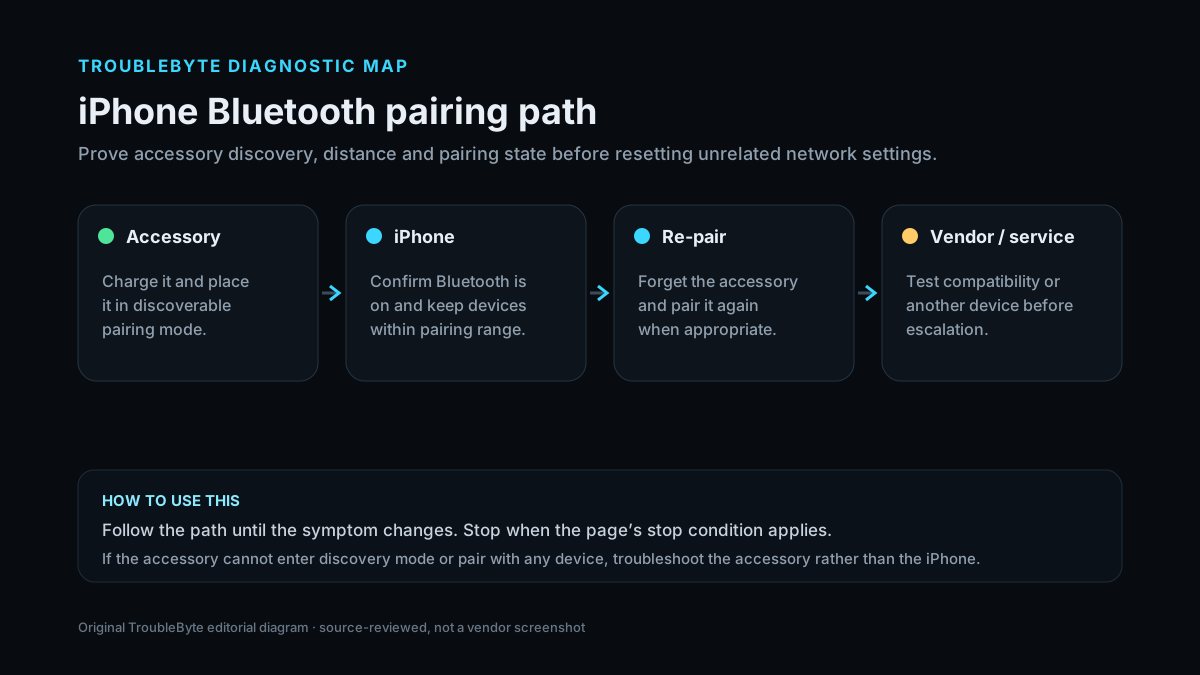
Choose a local-first diagnostic tool
Use a TroubleByte tool to inspect an error, DNS record or local system context before changing settings.
TroubleByte diagnostic path
Charge and restart the accessory.
Put it in pairing mode near iPhone.
Forget and re-pair stale connections.
Test other accessories/devices before hardware conclusions.
Original TroubleByte diagnostic map. It summarizes the cited troubleshooting order; it is not a vendor screenshot.
Use the symptom to choose the next branch
Can the accessory connect to another device?
Focus on iPhone pairing/app permission state.
Focus on accessory power, firmware or hardware.
Can the iPhone connect to a different known-good accessory?
Keep the issue scoped to this accessory.
Treat the iPhone Bluetooth stack/radio as the shared suspect.
Original TroubleByte decision aid derived from the cited troubleshooting scope. It does not replace vendor documentation.
What this usually means
The key scope check is whether the iPhone can connect to any Bluetooth accessory and whether the accessory can connect to another device. If one accessory alone fails, its power, discovery mode, compatibility or stale pairing is more likely than a broken iPhone Bluetooth radio.
What we verified from the source material
Apple recommends checking proximity, power, discovery mode, app Bluetooth permission and stale/competing pairings. It advises unpairing and pairing again and escalating when no accessories can connect or Bluetooth cannot be enabled.
Prerequisites and checks
Prepare first
- Know how the accessory enters discovery mode.
- Charge the accessory before testing.
- Disconnect it from other nearby devices if it auto-connects elsewhere.
Checks that prevent the wrong fix
- Confirm the accessory is powered, charged and in discovery mode.
- Check whether it is still paired/connected to another nearby device.
- Unpair it from the iPhone and pair again.
Applies to
Solutions, in order
Restore accessory discovery and pairing
- Move the accessory close to the iPhone and turn it off/on.
- Fully charge it or replace batteries.
- Put it in the manufacturer’s discovery/pairing mode.
- If it was previously paired, forget/unpair it on iPhone and pair again.
Why this can work: Apple’s first steps are proximity, accessory power and discovery/re-pairing.
Remove competing connections and app blocks
- Disconnect/unpair the accessory from other phones, tablets or computers it may prefer.
- If an accessory app is involved, check Settings > Privacy & Security > Bluetooth for app access.
- Restart the iPhone and accessory, then pair again.
- Confirm accessory compatibility or firmware with its manufacturer if only this device fails.
Why this can work: Apple notes that accessories connected to other devices and app Bluetooth permissions can block the expected pairing path.
How to know the fix actually worked
- The accessory appears as connected in iPhone Bluetooth settings.
- Its intended function works and it reconnects after one normal disconnect/reconnect.
Do not count a temporary disappearance of the symptom as a confirmed fix if the problem normally returns after a restart, reconnect or several minutes of use.
When not to keep changing things
- If Bluetooth is grayed out or no known-good accessories can connect, stop repeating one-accessory resets and contact Apple Support.
Escalation: If the iPhone cannot turn Bluetooth on or cannot connect to any known-good accessories while those accessories work elsewhere, contact Apple Support instead of repeatedly resetting individual accessories.
Sources used for this record
Primary · checked Sep 8, 2026Apple — If a Bluetooth accessory won't connect to your iPhone or iPadFirst-party documentation used as the primary evidence source for this troubleshooting record.Corroborating · checked Sep 8, 2026Apple — Connect iPhone to Bluetooth accessoriesApple iPhone User Guide corroborates discovery mode, pairing, distance and unpair/re-pair behavior.Need private help with this guide?
If the guide did not resolve the problem, send a private case to TroubleByte. It is separate from the public discussion below.
Discuss this exact problem
Share what happened on your system, ask a focused follow-up question, or add evidence that may help someone with the same symptom. Community posts are separate from TroubleByte editorial verification.
Start a discussion
Revision history
Show 1 recorded revision
2026-09-08 — Created for the v1.1 content-scale pass from current first-party documentation; public indexing is controlled by the launch allowlist.