
Pixel hotspot not working
Pixel hotspot failures can come from mobile-data service, carrier plan restrictions, Data Saver, hotspot configuration or model-specific Wi-Fi/hotspot behavior. Google recommends checking hotspot state and carrier support before deeper resets.
Prove mobile data and tethering eligibility
Confirm mobile data works and your carrier plan supports tethering, turn off Data Saver, then toggle Settings > Network & internet > Hotspot & tethering > Wi-Fi hotspot off and on before changing broader network settings.
- Turn off Wi-Fi and verify mobile data works on the Pixel.
- Confirm your carrier plan supports tethering/hotspot.
- Turn off Data Saver if enabled.
Why this branch first: Google explicitly notes carrier limits and requires working mobile data for tethering.
Choose a local-first diagnostic tool
Use a TroubleByte tool to inspect an error, DNS record or local system context before changing settings.
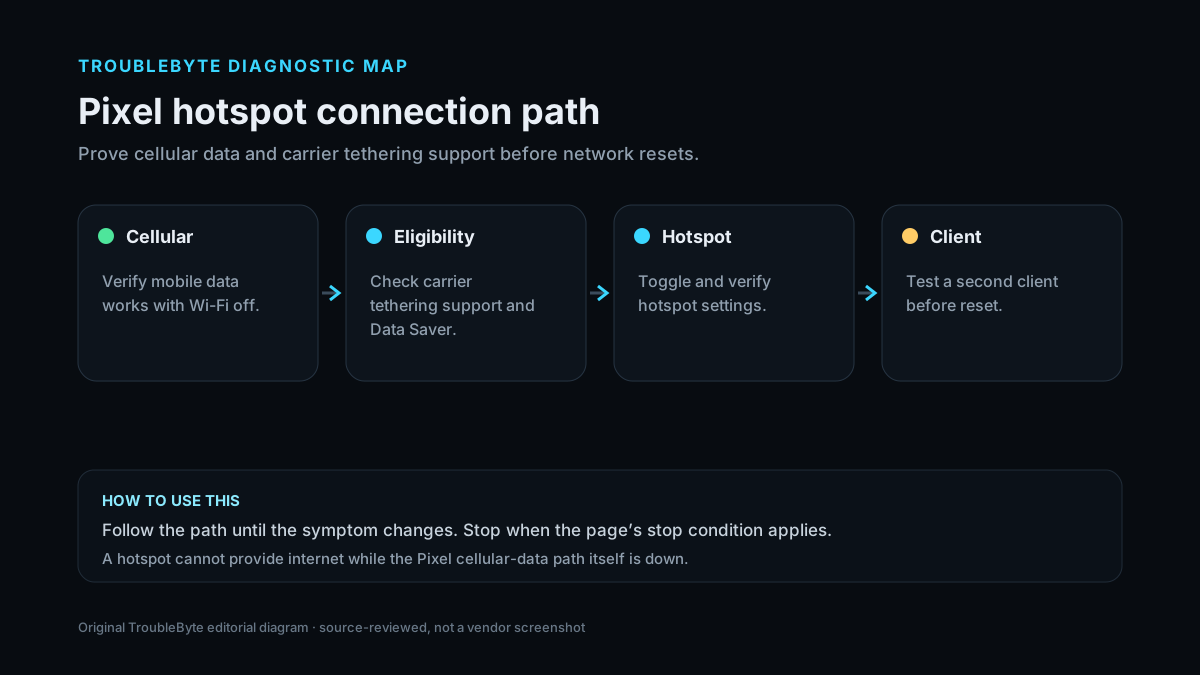
TroubleByte diagnostic path
Confirm mobile data works.
Check carrier tethering support and Data Saver.
Toggle and verify hotspot settings.
Test with another device before reset.
Original TroubleByte diagnostic map. It summarizes the cited troubleshooting order; it is not a vendor screenshot.
Use the symptom to choose the next branch
Does mobile data work on the Pixel with Wi-Fi disabled?
Continue with hotspot configuration and carrier tethering checks.
Fix the cellular path first; the hotspot cannot provide internet without it.
Can a second client connect to the hotspot?
The first client may be the fault domain.
Keep the investigation on Pixel hotspot configuration, plan support or Android state.
Original TroubleByte decision aid derived from the cited troubleshooting scope. It does not replace vendor documentation.
What this usually means
A hotspot can be visible but have no internet because the phone itself lacks mobile data, or the carrier may restrict tethering. Google also notes Data Saver and automatic hotspot shutdown behavior, so these should be separated from Wi-Fi compatibility or device failure.
What we verified from the source material
Google’s Pixel Wi-Fi guidance includes a dedicated hotspot troubleshooting section covering hotspot state, carrier support, automatic shutdown and model behavior. Its tethering documentation adds Data Saver and plan restrictions as prerequisites.
Prerequisites and checks
Prepare first
- Know whether the client sees the hotspot SSID.
- Check whether the hotspot works with a second client device.
- Keep the Pixel powered because hotspot use can increase battery and heat.
Checks that prevent the wrong fix
- Verify normal mobile data on the Pixel with Wi-Fi off.
- Confirm the carrier plan allows tethering.
- Turn off Data Saver and toggle Wi-Fi hotspot.
Applies to
Solutions, in order
Prove mobile data and tethering eligibility
- Turn off Wi-Fi and verify mobile data works on the Pixel.
- Confirm your carrier plan supports tethering/hotspot.
- Turn off Data Saver if enabled.
Why this can work: Google explicitly notes carrier limits and requires working mobile data for tethering.
Restart and reconfigure the hotspot path
- Open Settings > Network & internet > Hotspot & tethering > Wi-Fi hotspot.
- Turn the hotspot off and back on.
- Confirm the current password and connect a second client if possible.
- Review automatic hotspot shutdown behavior if it turns itself off.
Why this can work: Google documents the hotspot control, automatic shutdown and client-connection behavior.
How to know the fix actually worked
- A client connects and reaches the internet through the Pixel hotspot.
- The hotspot remains stable for several minutes under normal use.
Do not count a temporary disappearance of the symptom as a confirmed fix if the problem normally returns after a restart, reconnect or several minutes of use.
When not to keep changing things
- If mobile data itself is down, stop hotspot changes and fix the cellular/carrier path first.
Escalation: If hotspot remains unavailable across multiple clients with working mobile data and confirmed carrier support, use Pixel connectivity diagnostics or Google support before a factory reset.
Sources used for this record
Primary · checked Sep 8, 2026Google — How to fix Wi-Fi connection problemsFirst-party documentation used as evidence for this troubleshooting record.Corroborating · checked Sep 8, 2026Google — Share a mobile connection by tethering or hotspot on PixelFirst-party documentation used as evidence for this troubleshooting record.Need private help with this guide?
If the guide did not resolve the problem, send a private case to TroubleByte. It is separate from the public discussion below.
Discuss this exact problem
Share what happened on your system, ask a focused follow-up question, or add evidence that may help someone with the same symptom. Community posts are separate from TroubleByte editorial verification.
Start a discussion
Revision history
Show 1 recorded revision
2026-09-08 — Created for the v1.2 search-quality and content-scale pass from current first-party documentation; public indexing is controlled by the launch allowlist.