
Docker published port is not reachable
Docker containers are isolated by default, so a service is not reachable from outside the host until the correct container port is published with `-p` or `--publish`; a Dockerfile `EXPOSE` instruction alone does not create a host mapping. A localhost-only host bind can also intentionally prevent remote access.
Verify the published port mapping
Check `docker ps` or Compose output for the actual host-to-container mapping. Confirm the application listens on the container port, then verify whether the publish bind is all interfaces or only 127.0.0.1 and whether the host firewall allows the intended access.
- Run `docker ps` or inspect the Compose service ports.
- Confirm the mapping uses the intended HOST_PORT:CONTAINER_PORT pair.
- Inside the container, verify the application is listening on the container-side port.
- Test the host port locally before testing from another machine.
Why this branch first: Docker documents that bridge-network services require an explicit published port for access outside the host.
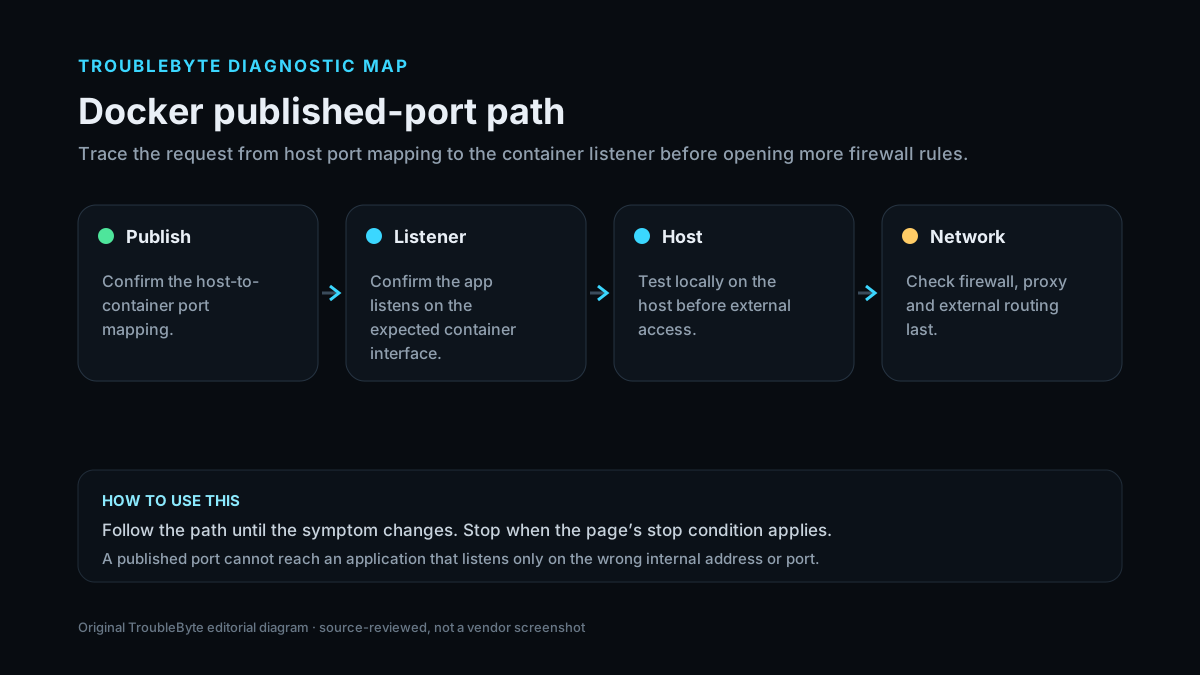
Check Docker port-binding signals
Look for local bind and published-port messages in pasted Docker output before changing firewall or proxy settings.
TroubleByte diagnostic path
Verify the process listens internally.
Confirm HOST_PORT:CONTAINER_PORT.
Check localhost-only vs external bind.
Allow only the intended path and retest.
Original TroubleByte diagnostic map. It summarizes the cited troubleshooting order; it is not a vendor screenshot.
What this usually means
There are three different scopes to keep separate: the process listening inside the container, Docker’s published HOST_PORT:CONTAINER_PORT mapping, and the host/network firewall path. If the mapping is bound to 127.0.0.1, remote clients are intentionally excluded.
What we verified from the source material
Docker’s documentation explains that bridge-network containers are isolated until ports are published, defines HOST_PORT:CONTAINER_PORT mapping, and states that publishing specifically to 127.0.0.1 or ::1 limits access to the Docker host.
Prerequisites and checks
Prepare first
- Identify the exact container port the application listens on.
- Record the Docker publish mapping before recreating the container.
- Know whether the desired client is local to the Docker host or remote.
Checks that prevent the wrong fix
- Confirm the service is listening on the expected port inside the container.
- Inspect the exact host IP, host port and container port shown by Docker.
- Determine whether the client is on the Docker host or a remote machine.
Applies to
Solutions, in order
Verify the published port mapping
- Run `docker ps` or inspect the Compose service ports.
- Confirm the mapping uses the intended HOST_PORT:CONTAINER_PORT pair.
- Inside the container, verify the application is listening on the container-side port.
- Test the host port locally before testing from another machine.
Why this can work: Docker documents that bridge-network services require an explicit published port for access outside the host.
Check host bind address and firewall scope
- If the mapping begins with 127.0.0.1 or ::1, recognize that it is intentionally local-only.
- For remote access, bind to the intended host interface or default all-interface publish only when that exposure is appropriate.
- Check the host firewall for the specific published port.
- Retest without disabling unrelated firewall protections.
Why this can work: Docker documents that a localhost host-IP publish is only accessible from the Docker host, while default publishing binds to all host addresses.
How to know the fix actually worked
- A local request to the published host port reaches the container service.
- If remote access is intended, a remote client reaches the same service through the intended host interface and firewall rule.
Do not count a temporary disappearance of the symptom as a confirmed fix if the problem normally returns after a restart, reconnect or several minutes of use.
When not to keep changing things
- If the app is not listening inside the container, stop changing Docker firewall rules and fix the service bind/listen configuration first.
Escalation: If Docker shows the correct mapping and the process is listening but remote traffic is still blocked, inspect the host firewall/routing path. Avoid disabling the firewall globally just to test one published port.
Sources used for this record
Primary · checked Sep 7, 2026Docker — Publishing and exposing portsFirst-party documentation used to verify the troubleshooting scope and steps.Corroborating · checked Sep 7, 2026Docker — Port publishing and mappingFirst-party documentation used to verify the troubleshooting scope and steps.Need private help with this guide?
If the guide did not resolve the problem, send a private case to TroubleByte. It is separate from the public discussion below.
Discuss this exact problem
Share what happened on your system, ask a focused follow-up question, or add evidence that may help someone with the same symptom. Community posts are separate from TroubleByte editorial verification.
Start a discussion
Revision history
Show 2 recorded revisions
2026-09-26 — Source review refreshed against cited current first-party documentation; diagnostic scope confirmed. No hands-on test claimed.
2026-09-07 — Created for the v0.8 content-scale pass from current first-party documentation; held noindex for editorial review.