
Cloudflare 502 Bad Gateway: origin or edge?
Cloudflare says 502 and 504 errors most commonly originate at the web server, but Cloudflare can also generate them. The first diagnostic task is identifying whether the origin or Cloudflare produced the response.
Check the origin and upstream application chain
Capture the exact 502 page and headers, then determine whether the origin returned 502 or Cloudflare generated it. Check origin health and error logs before changing DNS, TLS or application settings.
- Confirm the origin web server is running and serving the failing path.
- Inspect web server, application, upstream proxy and load-balancer logs at the failure time.
- If the origin itself returns 502/504, fix the upstream/application cause first.
- Retest the origin and then the proxied hostname.
Why this branch first: Cloudflare states that origin-generated 502/504 responses are the most common case.
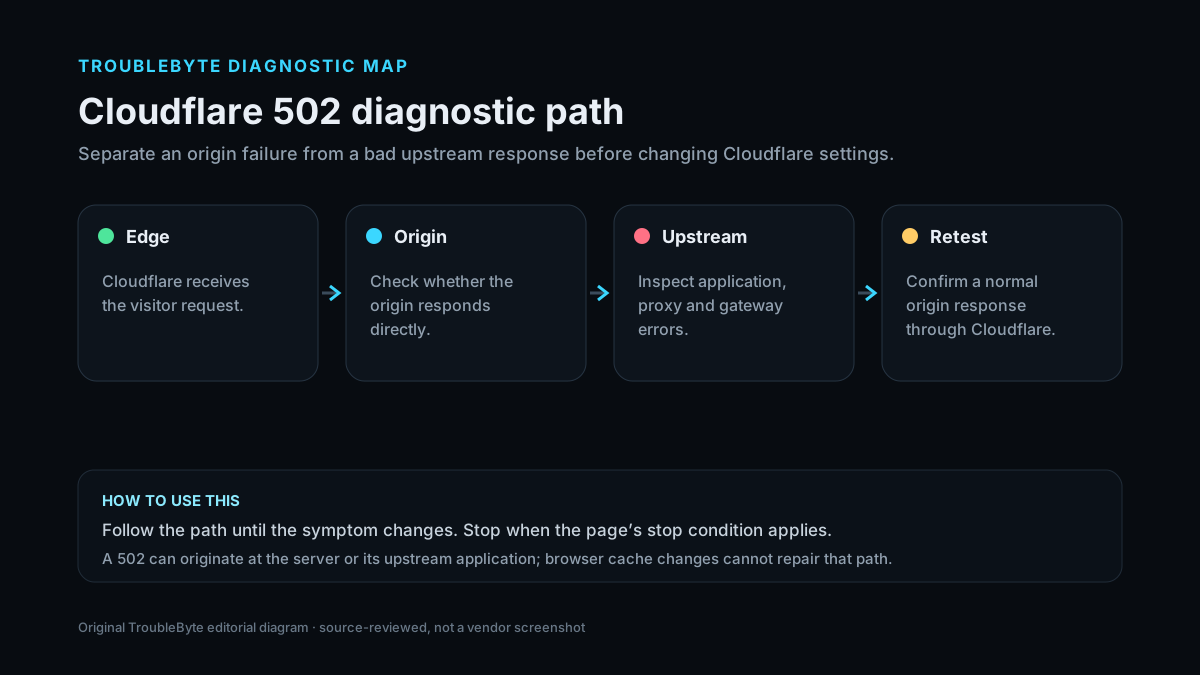
Decode HTTP 502 before changing the origin
Separate the HTTP status meaning from the Cloudflare-specific troubleshooting path on this page.
TroubleByte diagnostic path
Capture the exact Cloudflare error.
Check whether the origin is up and reachable.
Check firewall, DNS and TLS scope for that error.
Retest through Cloudflare and confirm logs.
Original TroubleByte diagnostic map. It summarizes the cited troubleshooting order; it is not a vendor screenshot.
What this usually means
A 502 is not one root cause. With Cloudflare in front, the same status can be forwarded from the origin or generated at the edge. That distinction determines whether you inspect the application/upstream stack, origin reachability or Cloudflare-specific diagnostics.
What we verified from the source material
Cloudflare’s current 502/504 documentation says the error can be returned by the origin or generated by Cloudflare, with origin responses being the more common cause, and recommends identifying the source before troubleshooting the corresponding layer.
Prerequisites and checks
Prepare first
- Record the exact Cloudflare error code and Ray ID if shown.
- Confirm whether the site owner can reach the origin directly from a controlled network.
- Check the timestamp/timezone before reading origin logs.
Checks that prevent the wrong fix
- Capture the failing URL, exact time and Ray ID if present.
- Compare the Cloudflare-branded error details with origin/server logs.
- Check whether direct origin health checks show an upstream/application failure.
Applies to
Solutions, in order
Check the origin and upstream application chain
- Confirm the origin web server is running and serving the failing path.
- Inspect web server, application, upstream proxy and load-balancer logs at the failure time.
- If the origin itself returns 502/504, fix the upstream/application cause first.
- Retest the origin and then the proxied hostname.
Why this can work: Cloudflare states that origin-generated 502/504 responses are the most common case.
Identify a Cloudflare-generated 502/504
- Inspect the error page and response headers for Cloudflare diagnostics.
- Check Cloudflare status and zone/error analytics where available.
- Preserve Ray ID, time, URL and relevant logs.
- Escalate only after origin health has been verified.
Why this can work: Cloudflare documents that some 502/504 errors originate from Cloudflare rather than the origin.
How to know the fix actually worked
- The Cloudflare error no longer reproduces and the origin responds through the proxied hostname.
- Origin logs and Cloudflare analytics no longer show the same failure condition.
Do not count a temporary disappearance of the symptom as a confirmed fix if the problem normally returns after a restart, reconnect or several minutes of use.
When not to keep changing things
- If you are only a visitor, do not attempt origin/firewall changes; report the error and Ray ID to the site owner.
Escalation: If the origin is healthy and the response is clearly Cloudflare-generated across multiple locations, collect Cloudflare diagnostic details before escalating to the provider.
Sources used for this record
Primary · checked Sep 7, 2026Cloudflare — Error 502 or 504First-party documentation used to verify the troubleshooting scope and steps.Corroborating · checked Sep 7, 2026Cloudflare — Cloudflare 5xx errorsFirst-party documentation used to verify the troubleshooting scope and steps.Need private help with this guide?
If the guide did not resolve the problem, send a private case to TroubleByte. It is separate from the public discussion below.
Discuss this exact problem
Share what happened on your system, ask a focused follow-up question, or add evidence that may help someone with the same symptom. Community posts are separate from TroubleByte editorial verification.
Start a discussion
Revision history
Show 2 recorded revisions
2026-09-26 — Source review refreshed against current Cloudflare documentation; diagnostic scope confirmed. No hands-on test claimed.
2026-09-07 — Created for the v0.8 content-scale pass from current first-party documentation; held noindex for editorial review.