
Cloudflare Error 521: Web server is down
Cloudflare defines Error 521 as the origin web server refusing connections from Cloudflare. Common causes include an offline origin application or security rules blocking Cloudflare IP ranges.
Restore the origin listener
Verify the origin web server is actually running and listening on the port required by the Cloudflare SSL/TLS mode, then check that the firewall or security stack is not blocking Cloudflare IP ranges.
- Confirm the web server process is running.
- Verify it is bound to the correct interface and the port expected by the current Cloudflare encryption mode.
- Test the origin locally or through an authorized direct-origin path.
- Restart only the affected service if necessary, then retest through Cloudflare.
Why this branch first: Cloudflare lists an offline origin application and incorrect listening state among the primary causes of 521.
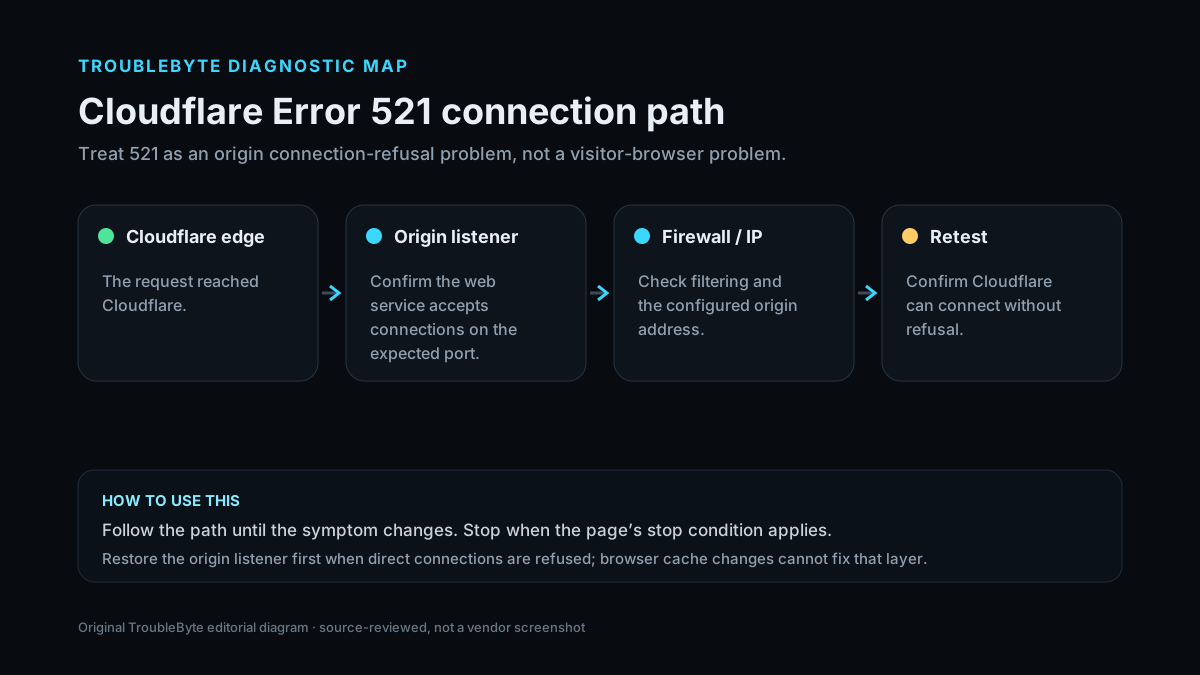
Decode Cloudflare 521
Confirm what the 521 response represents, then use this record to trace the origin refusal or blocking condition.
TroubleByte diagnostic path
Capture the exact Cloudflare error.
Check whether the origin is up and reachable.
Check firewall, DNS and TLS scope for that error.
Retest through Cloudflare and confirm logs.
Original TroubleByte diagnostic map. It summarizes the cited troubleshooting order; it is not a vendor screenshot.
Use the symptom to choose the next branch
Can the origin server accept a direct connection on the expected HTTP or HTTPS port?
Inspect firewall allowlists, origin IP configuration and whether Cloudflare traffic is being refused.
Restore the origin web service/listener first; Cloudflare cannot proxy to a server that is not accepting connections.
Do origin logs show Cloudflare connection attempts being refused or blocked?
Correct the firewall/security rule and retest through Cloudflare.
Verify DNS origin IP and listening address/port before changing TLS or browser settings.
Original TroubleByte decision aid derived from the cited troubleshooting scope. It does not replace vendor documentation.
What this usually means
Error 521 specifically points to a refused connection rather than a slow timeout. That makes origin service state, bind/listen ports, firewall blocks and SSL/TLS-mode expectations more relevant than application-page debugging.
What we verified from the source material
Cloudflare states that Error 521 occurs when the origin refuses Cloudflare connections and highlights two dominant causes: the origin web server is offline or Cloudflare requests are blocked. Its guidance also ties the required origin listening port to the configured SSL/TLS mode.
Prerequisites and checks
Prepare first
- Record the exact Cloudflare error code and Ray ID if shown.
- Confirm whether the site owner can reach the origin directly from a controlled network.
- Check the timestamp/timezone before reading origin logs.
Checks that prevent the wrong fix
- Check the origin process/service status.
- Confirm the origin is listening on port 80 for Flexible or port 443 for Full/Full (strict), as applicable.
- Review firewall and security logs for blocked Cloudflare connections.
Applies to
Solutions, in order
Restore the origin listener
- Confirm the web server process is running.
- Verify it is bound to the correct interface and the port expected by the current Cloudflare encryption mode.
- Test the origin locally or through an authorized direct-origin path.
- Restart only the affected service if necessary, then retest through Cloudflare.
Why this can work: Cloudflare lists an offline origin application and incorrect listening state among the primary causes of 521.
Check firewall blocks for Cloudflare IPs
- Inspect host firewall, WAF and security-tool logs.
- Confirm Cloudflare IP ranges are not blocked or rate limited.
- Create the narrowest necessary allow rule rather than disabling the firewall.
- Retest and verify the origin logs show accepted Cloudflare connections.
Why this can work: Cloudflare identifies blocked Cloudflare requests as one of the two most common causes of 521.
How to know the fix actually worked
- The Cloudflare error no longer reproduces and the origin responds through the proxied hostname.
- Origin logs and Cloudflare analytics no longer show the same failure condition.
Do not count a temporary disappearance of the symptom as a confirmed fix if the problem normally returns after a restart, reconnect or several minutes of use.
When not to keep changing things
- If you are only a visitor, do not attempt origin/firewall changes; report the error and Ray ID to the site owner.
Escalation: If the origin listens correctly and Cloudflare IP ranges are allowed but 521 persists, collect origin firewall/web-server logs and Cloudflare Ray/error details before escalating.
Sources used for this record
Primary · checked Sep 7, 2026Cloudflare — Error 521First-party documentation used to verify the troubleshooting scope and steps.Corroborating · checked Sep 7, 2026Cloudflare — Cloudflare 5xx errorsFirst-party documentation used to verify the troubleshooting scope and steps.Need private help with this guide?
If the guide did not resolve the problem, send a private case to TroubleByte. It is separate from the public discussion below.
Discuss this exact problem
Share what happened on your system, ask a focused follow-up question, or add evidence that may help someone with the same symptom. Community posts are separate from TroubleByte editorial verification.
Start a discussion
Revision history
Show 3 recorded revisions
2026-09-26 — Source review refreshed against current Cloudflare documentation; diagnostic scope confirmed. No hands-on test claimed.
2026-09-07 — Promoted to launch candidate with a two-branch diagnostic decision aid and original TroubleByte diagnostic media.
2026-09-07 — Created for the v0.8 content-scale pass from current first-party documentation; held noindex for editorial review.