
Cloudflare Error 522: Connection timed out
Cloudflare defines Error 522 as a timeout while contacting the origin. It can occur before the TCP connection is established or after connection when the origin does not acknowledge the request in time.
Verify origin availability and address
Check whether the origin is online and responsive, whether Cloudflare IP ranges are blocked or rate limited, and whether the Cloudflare DNS origin IP still matches the actual server. Then investigate overload or packet loss.
- Confirm the origin server is online and responsive.
- Verify Cloudflare DNS points to the current origin IP.
- Check that the origin accepts requests on the expected port.
- Retest while watching origin logs for incoming Cloudflare connections.
Why this branch first: Cloudflare lists offline/overloaded origin state and a mismatched origin IP among common 522 causes.
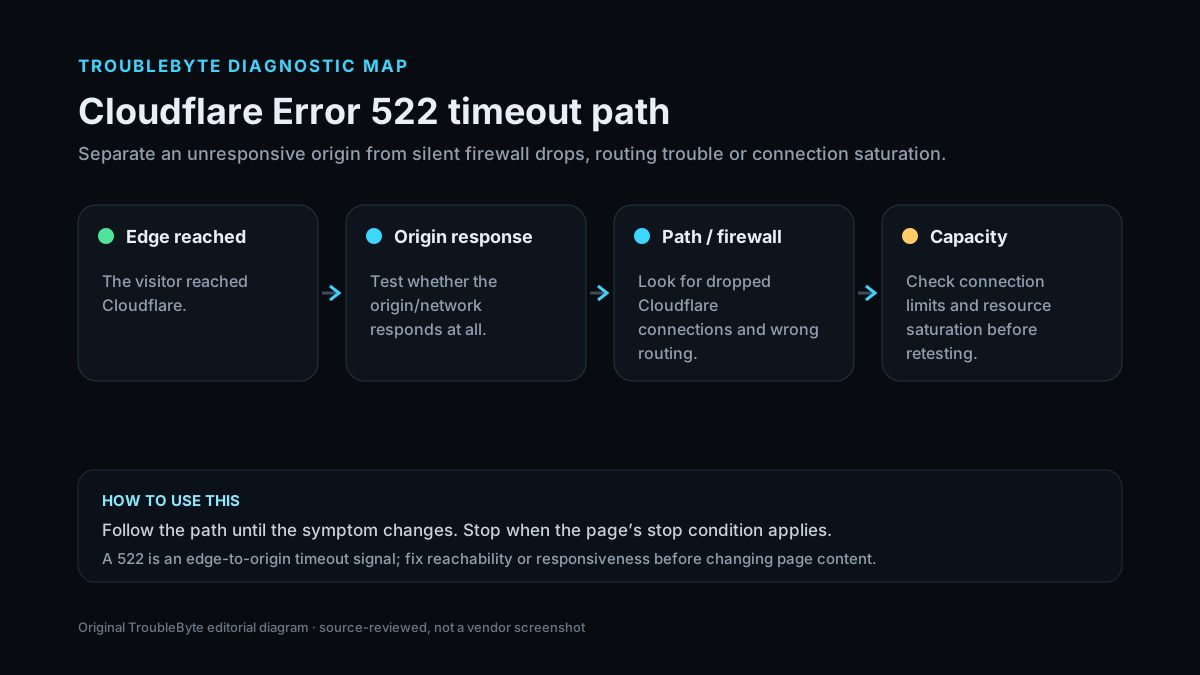
Decode Cloudflare 522
Confirm the timeout layer before changing DNS, firewall or origin-server settings.
TroubleByte diagnostic path
Capture the exact Cloudflare error.
Check whether the origin is up and reachable.
Check firewall, DNS and TLS scope for that error.
Retest through Cloudflare and confirm logs.
Original TroubleByte diagnostic map. It summarizes the cited troubleshooting order; it is not a vendor screenshot.
Use the symptom to choose the next branch
Is the origin responsive when tested directly from an appropriate external path?
Focus on firewall/rate-limit rules and Cloudflare-to-origin reachability rather than application content.
Restore origin/network responsiveness before changing Cloudflare settings.
Do firewall or network logs show Cloudflare connections timing out or being silently dropped?
Correct filtering/routing and retest.
Verify the configured origin IP and upstream network path, then compare origin resource saturation and connection limits.
Original TroubleByte decision aid derived from the cited troubleshooting scope. It does not replace vendor documentation.
What this usually means
Unlike 521, which is a refusal, 522 is a timeout. The path may be silently dropping traffic, the origin may be overloaded/offline, or DNS may point Cloudflare at the wrong origin IP. That makes timing and network/firewall evidence important.
What we verified from the source material
Cloudflare documents two 522 timeout stages and lists blocked Cloudflare IPs, overloaded/offline origins, wrong origin DNS address and packet loss among the common causes, with network-path evidence recommended for escalation.
Prerequisites and checks
Prepare first
- Record the exact Cloudflare error code and Ray ID if shown.
- Confirm whether the site owner can reach the origin directly from a controlled network.
- Check the timestamp/timezone before reading origin logs.
Checks that prevent the wrong fix
- Check the origin IP configured in Cloudflare DNS against the current server IP.
- Review firewall/security logs for drops or rate limits affecting Cloudflare IPs.
- Check origin load, availability and packet-loss/network telemetry around the failure time.
Applies to
Solutions, in order
Verify origin availability and address
- Confirm the origin server is online and responsive.
- Verify Cloudflare DNS points to the current origin IP.
- Check that the origin accepts requests on the expected port.
- Retest while watching origin logs for incoming Cloudflare connections.
Why this can work: Cloudflare lists offline/overloaded origin state and a mismatched origin IP among common 522 causes.
Investigate dropped or blocked Cloudflare traffic
- Confirm Cloudflare IP ranges are not blocked or rate limited.
- Inspect host and upstream firewall logs for drops.
- Check for packet loss and hosting-network incidents.
- Collect MTR/traceroute and relevant logs if escalation is required.
Why this can work: Cloudflare specifically calls out blocked Cloudflare IPs, packet loss and dropped requests as 522 causes.
How to know the fix actually worked
- The Cloudflare error no longer reproduces and the origin responds through the proxied hostname.
- Origin logs and Cloudflare analytics no longer show the same failure condition.
Do not count a temporary disappearance of the symptom as a confirmed fix if the problem normally returns after a restart, reconnect or several minutes of use.
When not to keep changing things
- If you are only a visitor, do not attempt origin/firewall changes; report the error and Ray ID to the site owner.
Escalation: If the origin is healthy and the path still times out, collect traceroute/MTR and origin logs as Cloudflare recommends before escalating to the hosting/network provider.
Sources used for this record
Primary · checked Sep 7, 2026Cloudflare — Error 522First-party documentation used to verify the troubleshooting scope and steps.Corroborating · checked Sep 7, 2026Cloudflare — Cloudflare 5xx errorsFirst-party documentation used to verify the troubleshooting scope and steps.Need private help with this guide?
If the guide did not resolve the problem, send a private case to TroubleByte. It is separate from the public discussion below.
Discuss this exact problem
Share what happened on your system, ask a focused follow-up question, or add evidence that may help someone with the same symptom. Community posts are separate from TroubleByte editorial verification.
Start a discussion
Revision history
Show 3 recorded revisions
2026-09-26 — Source review refreshed against current Cloudflare documentation; diagnostic scope confirmed. No hands-on test claimed.
2026-09-07 — Promoted to launch candidate with a two-branch diagnostic decision aid and original TroubleByte diagnostic media.
2026-09-07 — Created for the v0.8 content-scale pass from current first-party documentation; held noindex for editorial review.