
Cloudflare Error 523: Origin is unreachable
Cloudflare 523 is a routing/reachability problem: Cloudflare cannot contact the configured origin because the origin IP is wrong or the network path has no usable route. It is distinct from 521 refusal and 522 timeout, so the fastest checks are DNS origin address and routing evidence rather than application code.
Verify the origin address and route
Verify the Cloudflare DNS A/AAAA record points to the real origin IP. If it is correct, investigate routing between Cloudflare and the origin with the hosting provider using traceroute/MTR evidence.
- Open Cloudflare DNS and confirm A/AAAA records use the current public origin IP.
- Check whether the hosting provider recently changed or migrated the server IP.
- Confirm the origin has a valid default/public route and is reachable from outside the local/private network.
- Retest through Cloudflare after correcting any DNS/IP mismatch.
Why this branch first: Cloudflare lists an incorrect origin IP and routing failure between Cloudflare and the origin as core 523 causes.
Choose a local-first diagnostic tool
Use a TroubleByte tool to inspect an error, DNS record or local system context before changing settings.
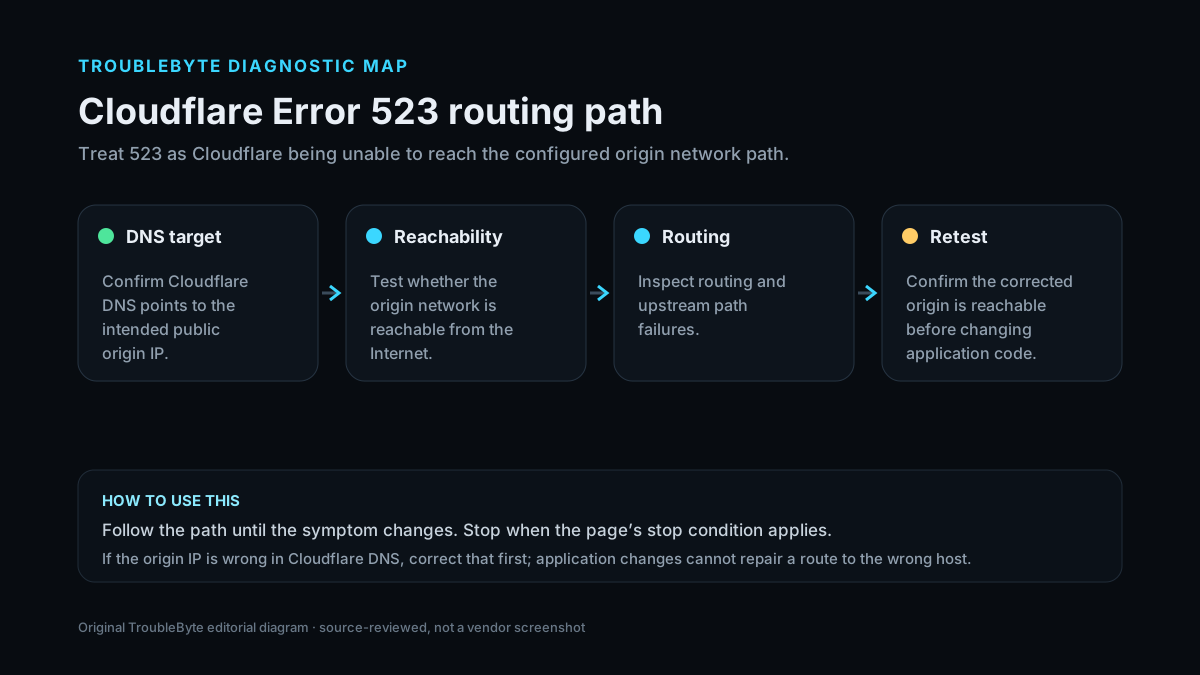
TroubleByte diagnostic path
Verify A/AAAA points to the current origin.
Confirm the server has public routing.
Collect MTR/traceroute with hosting provider.
Recheck through Cloudflare after route correction.
Original TroubleByte diagnostic map. It summarizes the cited troubleshooting order; it is not a vendor screenshot.
Use the symptom to choose the next branch
Does Cloudflare DNS point to the correct current public origin IP?
Investigate network routing/provider path.
Correct the A/AAAA record and retest.
Can the hosting provider confirm a valid route to/from Cloudflare networks?
Look for narrower Cloudflare/origin-specific routing evidence.
Fix the route before changing the web server/application.
Original TroubleByte decision aid derived from the cited troubleshooting scope. It does not replace vendor documentation.
What this usually means
523 means Cloudflare cannot route to the origin, not that the web application returned an HTTP error. A wrong A/AAAA address is the simplest cause. If the address is correct, the hosting network or intermediate route becomes the fault domain. In AWS or other routed environments, overly broad private routes can also capture Cloudflare address space.
What we verified from the source material
Cloudflare defines 523 as origin unreachable, commonly caused by an incorrect configured origin IP or missing network route. Its guidance tells site owners to confirm A/AAAA records and involve the hosting provider for routing investigation.
Prerequisites and checks
Prepare first
- Know the correct public origin IP.
- Have access to Cloudflare DNS and hosting/network support.
- Record the time and affected hostname before route investigation.
Checks that prevent the wrong fix
- Verify the configured Cloudflare A/AAAA origin address is current and correct.
- Confirm the origin host has normal public routing and no recent IP migration.
- Collect traceroute/MTR evidence with the hosting provider when the origin address is correct.
Applies to
Solutions, in order
Verify the origin address and route
- Open Cloudflare DNS and confirm A/AAAA records use the current public origin IP.
- Check whether the hosting provider recently changed or migrated the server IP.
- Confirm the origin has a valid default/public route and is reachable from outside the local/private network.
- Retest through Cloudflare after correcting any DNS/IP mismatch.
Why this can work: Cloudflare lists an incorrect origin IP and routing failure between Cloudflare and the origin as core 523 causes.
Escalate routing with evidence
- Ask the hosting/network provider to investigate the route between the origin and Cloudflare.
- Provide traceroute or MTR evidence and the relevant Cloudflare connection details/log time.
- In routed cloud environments, check for overly broad routes that accidentally capture Cloudflare public IP ranges.
- Retest only after the network path is corrected.
Why this can work: Cloudflare’s 523 documentation specifically calls for hosting-provider routing investigation and notes problematic broad routes in AWS as an example.
How to know the fix actually worked
- The hostname loads normally through Cloudflare without 523.
- Cloudflare-to-origin routing remains stable across repeated requests.
Do not count a temporary disappearance of the symptom as a confirmed fix if the problem normally returns after a restart, reconnect or several minutes of use.
When not to keep changing things
- If the origin IP in Cloudflare DNS is wrong, fix that first; do not spend time tuning application/PHP settings for a route that never reaches the server.
Escalation: If the DNS origin address is correct but Cloudflare still has no route, involve the hosting/network provider with MTR/traceroute and the Cloudflare IP/routing details rather than changing the web application.
Sources used for this record
Primary · checked Sep 8, 2026Cloudflare — Error 523First-party documentation used as the primary evidence source for this troubleshooting record.Corroborating · checked Sep 8, 2026Cloudflare — Cloudflare 5xx errorsFirst-party documentation used as corroborating evidence for this troubleshooting record.Need private help with this guide?
If the guide did not resolve the problem, send a private case to TroubleByte. It is separate from the public discussion below.
Discuss this exact problem
Share what happened on your system, ask a focused follow-up question, or add evidence that may help someone with the same symptom. Community posts are separate from TroubleByte editorial verification.
Start a discussion
Revision history
Show 1 recorded revision
2026-09-08 — Created for the v1.1 content-scale pass from current first-party documentation; public indexing is controlled by the launch allowlist.