
Cloudflare Error 524: A timeout occurred
Cloudflare 524 means the TCP connection to the origin succeeded, but the origin did not return an HTTP response within the proxy read timeout (125 seconds by default) or did not complete a write in time. That makes slow application work, long database queries and resource saturation more relevant than firewall reachability.
Find the slow origin work
Identify the exact slow URL and origin response time. Optimize or move long-running work out of a single HTTP request; investigate origin load/database work before changing Cloudflare DNS.
- Record the failing URL, Ray ID and exact time.
- Check origin access/application logs for request duration.
- Inspect database queries, external API calls, CPU/memory/I/O and worker saturation for that endpoint.
- Optimize the slow path and retest through Cloudflare.
Why this branch first: Cloudflare describes 524 as a successful origin connection followed by an HTTP response that exceeds the proxy timeout, often due to long work or overloaded resources.
Choose a local-first diagnostic tool
Use a TroubleByte tool to inspect an error, DNS record or local system context before changing settings.
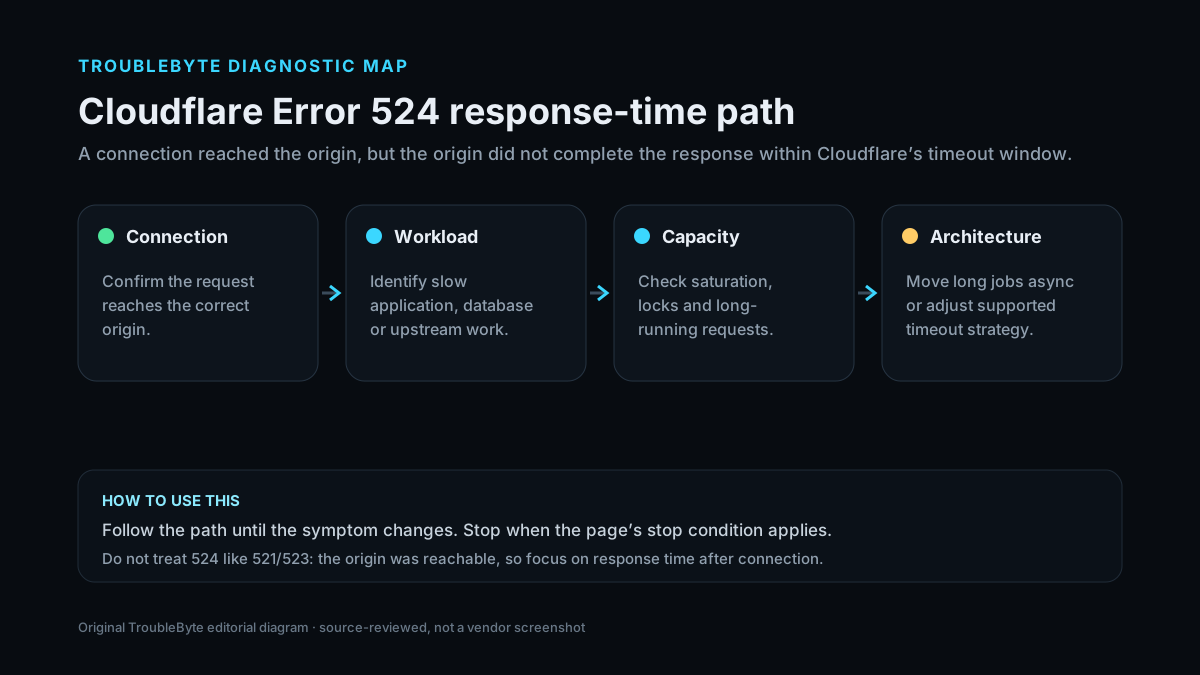
TroubleByte diagnostic path
Identify exact failing URL/time.
Measure origin response duration.
Find DB/app/resource bottleneck.
Move intentionally long jobs to async/polling.
Original TroubleByte diagnostic map. It summarizes the cited troubleshooting order; it is not a vendor screenshot.
Use the symptom to choose the next branch
Does the origin response time exceed roughly the Cloudflare read-timeout window?
Optimize or redesign the long request path.
Investigate intermittent worker/resource blocking and timing evidence.
Is the endpoint intentionally designed to run for minutes?
Move to background job/status polling or an appropriate non-proxied/Enterprise design.
Treat the delay as a performance regression and fix the origin path.
Original TroubleByte decision aid derived from the cited troubleshooting scope. It does not replace vendor documentation.
What this usually means
A 524 proves Cloudflare established the origin connection, so it is different from 522 connection timeout. The bottleneck is usually after connection: application processing, database work, queueing or origin resource pressure. Cloudflare’s default Proxy Read Timeout is 125 seconds, so requests designed to run longer should use asynchronous/polling patterns or a suitable non-proxied/Enterprise architecture.
What we verified from the source material
Cloudflare defines 524 as a successful origin connection where the response exceeds the default 125-second read timeout (or write timeout). It recommends investigating long-running/overloaded origin work and using polling or appropriate architecture for intentionally long jobs.
Prerequisites and checks
Prepare first
- Have access to origin/application logs with request timing.
- Record the failing URL and timestamp/Ray ID.
- Know whether the endpoint is expected to perform a long-running task.
Checks that prevent the wrong fix
- Identify the exact endpoint and measure origin response time.
- Check application, database and system resource logs during the 524.
- Determine whether the request is inherently long-running or unexpectedly slow.
Applies to
Solutions, in order
Find the slow origin work
- Record the failing URL, Ray ID and exact time.
- Check origin access/application logs for request duration.
- Inspect database queries, external API calls, CPU/memory/I/O and worker saturation for that endpoint.
- Optimize the slow path and retest through Cloudflare.
Why this can work: Cloudflare describes 524 as a successful origin connection followed by an HTTP response that exceeds the proxy timeout, often due to long work or overloaded resources.
Change the request architecture when work is intentionally long
- Move large exports/jobs to background processing when possible.
- Return a job ID quickly and let the client poll for completion instead of holding one request open.
- For suitable workloads, use a DNS-only hostname or Enterprise timeout controls only with a clear architecture decision.
- Monitor origin P95/P99 response times so the problem is caught before the timeout threshold.
Why this can work: Cloudflare recommends status polling for large HTTP processes and documents DNS-only/Enterprise options for requests that legitimately exceed the standard read timeout.
How to know the fix actually worked
- The endpoint completes through Cloudflare below the timeout threshold.
- Origin response-time monitoring shows the slow path has returned to an acceptable range.
Do not count a temporary disappearance of the symptom as a confirmed fix if the problem normally returns after a restart, reconnect or several minutes of use.
When not to keep changing things
- Do not increase retries against an overloaded origin; repeated long requests can amplify the resource problem.
Escalation: If the application legitimately needs requests longer than Cloudflare’s normal timeout, redesign the workflow for asynchronous status polling or use an architecture/plan that supports the required timeout instead of repeatedly retrying the same long request.
Sources used for this record
Primary · checked Sep 8, 2026Cloudflare — Error 524First-party documentation used as the primary evidence source for this troubleshooting record.Corroborating · checked Sep 8, 2026Cloudflare — Cloudflare 5xx errorsFirst-party documentation used as corroborating evidence for this troubleshooting record.Need private help with this guide?
If the guide did not resolve the problem, send a private case to TroubleByte. It is separate from the public discussion below.
Discuss this exact problem
Share what happened on your system, ask a focused follow-up question, or add evidence that may help someone with the same symptom. Community posts are separate from TroubleByte editorial verification.
Start a discussion
Revision history
Show 1 recorded revision
2026-09-08 — Created for the v1.1 content-scale pass from current first-party documentation; public indexing is controlled by the launch allowlist.