
Cloudflare Error 526: invalid SSL certificate
Cloudflare Error 526 is a certificate-validation failure at the origin under Full (Strict). Check the origin certificate’s expiry, hostname coverage, chain and trust source, and confirm the origin serves the correct certificate for the requested hostname.
Fix origin certificate validation
Inspect the certificate served by the origin for the production hostname. It must be valid for the hostname, unexpired and chain to a CA Cloudflare accepts or use a Cloudflare Origin CA certificate.
- Inspect the certificate served by the origin using the production hostname/SNI.
- Confirm it is unexpired, not revoked and covers the hostname in CN/SAN.
- Serve the required intermediate chain and use a CA trusted by Cloudflare or a Cloudflare Origin CA certificate.
- Reload/restart the origin TLS service and retest.
Why this branch first: Cloudflare’s 526 guidance requires a certificate that Full (Strict) can validate for the requested hostname.
Choose a local-first diagnostic tool
Use a TroubleByte tool to inspect an error, DNS record or local system context before changing settings.
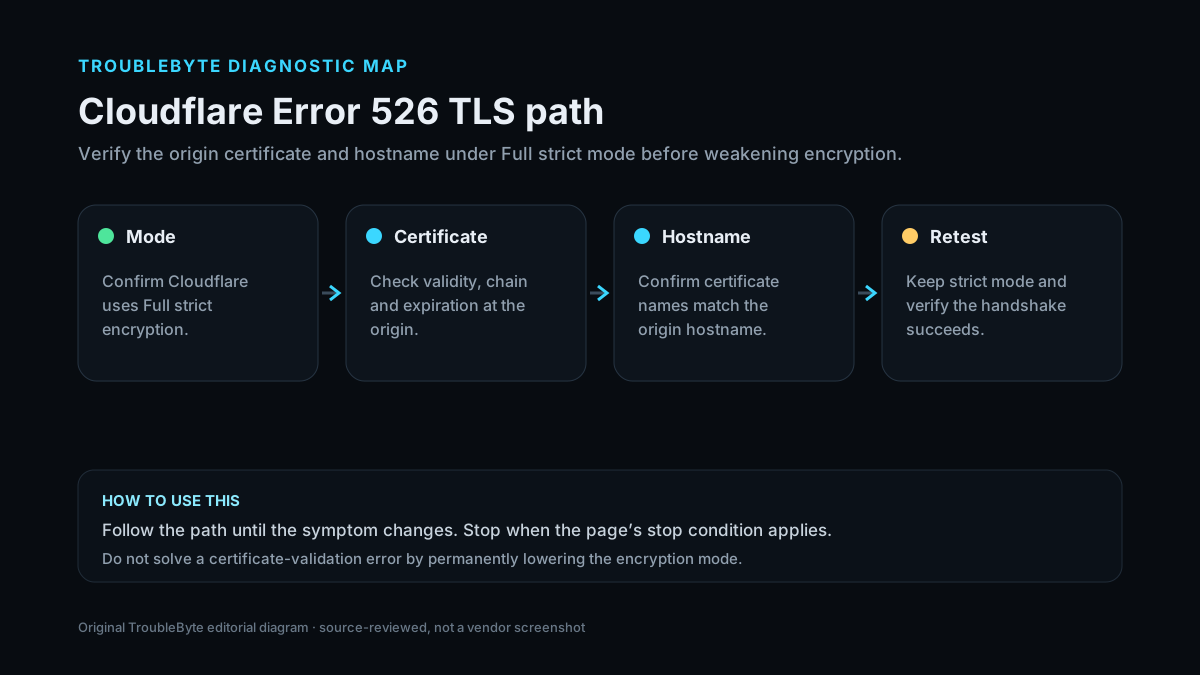
TroubleByte diagnostic path
Confirm Full (Strict).
Inspect what the origin actually serves.
Check expiry, hostname, issuer and chain.
Ensure the correct certificate is selected for the hostname.
Original TroubleByte diagnostic map. It summarizes the cited troubleshooting order; it is not a vendor screenshot.
What this usually means
Unlike Error 525, which is a handshake failure, Error 526 specifically means Cloudflare could not validate the origin certificate in Full (Strict). That narrows the evidence to certificate validity and presentation: expiration/revocation, hostname/SAN match, issuer/trust chain, complete intermediates and the certificate actually selected by SNI at the origin.
What we verified from the source material
Cloudflare defines 526 as inability to validate the origin certificate under Full (Strict). Current requirements include an unexpired certificate, valid trust source, hostname match and a complete certificate chain served by the origin.
Prerequisites and checks
Prepare first
- Have origin TLS configuration access.
- Know whether the origin uses a public CA, Cloudflare Origin CA or custom trust store.
- Preserve the current certificate/key before replacement.
Checks that prevent the wrong fix
- Confirm the zone is using Full (Strict).
- Inspect the certificate actually served by the origin for the production hostname/SNI.
- Check expiry, SAN/hostname match and intermediate chain.
Applies to
Solutions, in order
Fix origin certificate validation
- Inspect the certificate served by the origin using the production hostname/SNI.
- Confirm it is unexpired, not revoked and covers the hostname in CN/SAN.
- Serve the required intermediate chain and use a CA trusted by Cloudflare or a Cloudflare Origin CA certificate.
- Reload/restart the origin TLS service and retest.
Why this can work: Cloudflare’s 526 guidance requires a certificate that Full (Strict) can validate for the requested hostname.
Correct SNI/virtual-host certificate selection
- Check the origin virtual host/SNI mapping for the affected hostname.
- Confirm port 443 serves the intended certificate and complete chain.
- Remove stale/default certificate mappings that override the hostname.
- Retest through Cloudflare in Full (Strict).
Why this can work: A valid certificate elsewhere on the server does not help if the origin presents the wrong one for the hostname.
How to know the fix actually worked
- The origin certificate validates for the production hostname with a complete chain.
- Cloudflare requests complete without Error 526 while Full (Strict) remains enabled.
Do not count a temporary disappearance of the symptom as a confirmed fix if the problem normally returns after a restart, reconnect or several minutes of use.
When not to keep changing things
- Do not permanently downgrade TLS validation merely to suppress 526; fix origin certificate validity/presentation.
Escalation: If the origin certificate validates correctly outside Cloudflare but 526 persists, collect the exact served chain/SNI details and contact hosting or Cloudflare support.
Sources used for this record
Primary · checked Sep 7, 2026Cloudflare — Error 526First-party documentation used as the primary evidence source for this troubleshooting record.Corroborating · checked Sep 7, 2026Cloudflare — Full (strict) - SSL/TLS encryption modesFirst-party documentation used as the corroborating evidence source for this troubleshooting record.Need private help with this guide?
If the guide did not resolve the problem, send a private case to TroubleByte. It is separate from the public discussion below.
Discuss this exact problem
Share what happened on your system, ask a focused follow-up question, or add evidence that may help someone with the same symptom. Community posts are separate from TroubleByte editorial verification.
Start a discussion
Revision history
Show 2 recorded revisions
2026-09-26 — Source review refreshed against current Cloudflare documentation; diagnostic scope confirmed. No hands-on test claimed.
2026-09-07 — Created for the v0.9 launch-acceleration content pass from current first-party documentation; indexing remains disabled pending final launch review.