
ERR_TOO_MANY_REDIRECTS on Cloudflare
Cloudflare says redirect loops commonly come from a conflict between SSL/TLS encryption mode, edge certificate options or redirect rules and the redirects already configured at the origin.
Align Cloudflare encryption mode with origin redirects
Map the actual redirect chain first. Then make Cloudflare SSL/TLS mode and edge redirects consistent with the origin. Avoid having one layer force HTTPS while another sends the request back to HTTP.
- Check the current Cloudflare SSL/TLS encryption mode.
- If Flexible is used while the origin forces HTTP to HTTPS, move to Full or higher only after the origin has a valid HTTPS configuration.
- If Full/Full (strict) is used, remove any origin rule that sends HTTPS back to HTTP.
- Retest the chain from a clean browser session or curl.
Why this branch first: Cloudflare documents encryption-mode conflicts as a direct cause of redirect loops.
Decode the browser redirect error
Use the browser/error decoder to distinguish ERR_TOO_MANY_REDIRECTS from an HTTP status code, then follow this page to isolate the loop.
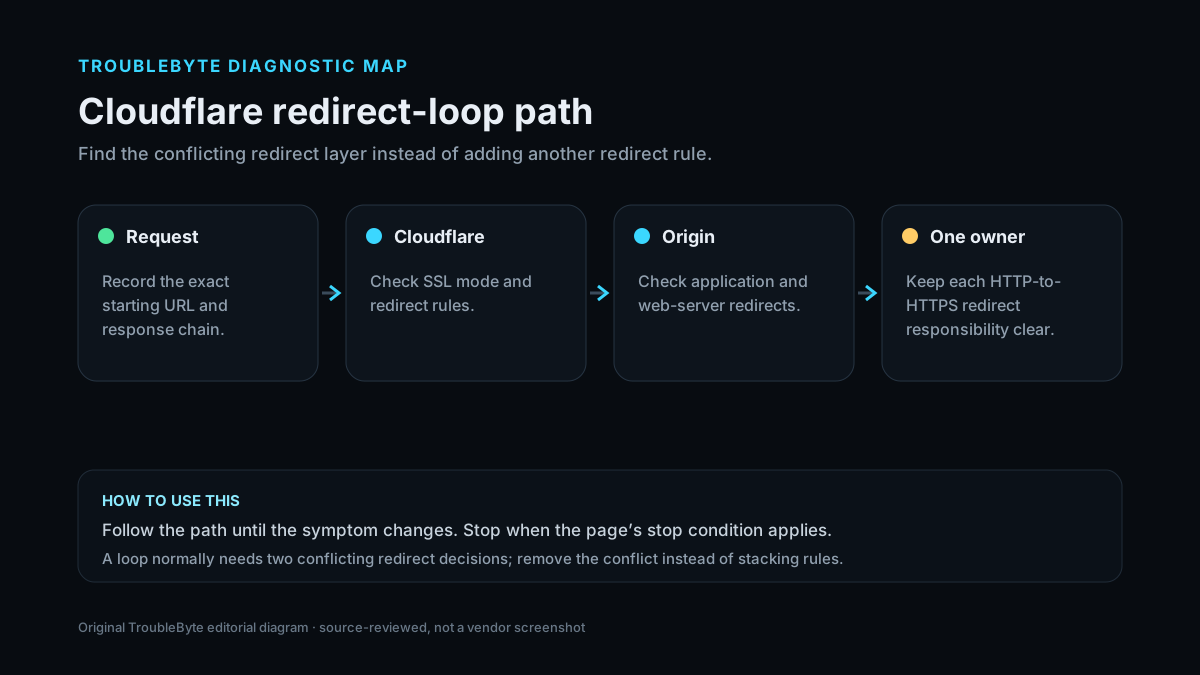
TroubleByte diagnostic path
Capture every Location hop.
Align edge-to-origin encryption.
Remove conflicting edge/origin redirects.
Confirm one stable canonical URL.
Original TroubleByte diagnostic map. It summarizes the cited troubleshooting order; it is not a vendor screenshot.
What this usually means
A redirect loop is a cycle, not a failed destination. With Cloudflare, common cycles arise when edge encryption/HTTPS behavior conflicts with origin redirects, or when two redirect rules send requests back and forth. The fix is to remove the contradiction, not add another redirect.
What we verified from the source material
Cloudflare’s redirect-loop documentation identifies SSL/TLS encryption mode conflicts, Always Use HTTPS/HSTS behavior and conflicting redirect rules as common ERR_TOO_MANY_REDIRECTS causes and recommends removing the contradictory redirect behavior.
Prerequisites and checks
Prepare first
- Capture the redirect chain before clearing settings.
- Know the origin’s intended canonical scheme and hostname.
- Check whether more than one layer controls HTTP-to-HTTPS or hostname redirects.
Checks that prevent the wrong fix
- Capture the redirect chain with browser DevTools or curl before changing settings.
- Record the Cloudflare SSL/TLS encryption mode.
- List active Always Use HTTPS, HSTS, Redirect Rules/Page Rules and origin redirects.
Applies to
Solutions, in order
Align Cloudflare encryption mode with origin redirects
- Check the current Cloudflare SSL/TLS encryption mode.
- If Flexible is used while the origin forces HTTP to HTTPS, move to Full or higher only after the origin has a valid HTTPS configuration.
- If Full/Full (strict) is used, remove any origin rule that sends HTTPS back to HTTP.
- Retest the chain from a clean browser session or curl.
Why this can work: Cloudflare documents encryption-mode conflicts as a direct cause of redirect loops.
Remove conflicting edge/origin redirect rules
- Review Always Use HTTPS, HSTS and Cloudflare Redirect Rules/Page Rules.
- Review the origin web server/application redirects for the same host/path.
- Remove or disable the rule that sends the request back to a previously visited URL/scheme.
- Keep one intentional canonical redirect and verify the final URL.
Why this can work: Cloudflare documents edge-certificate settings and conflicting redirect rules as additional loop causes.
How to know the fix actually worked
- The request reaches one stable canonical HTTPS URL without repeating a previous location.
- Refreshing or opening a private session no longer triggers the redirect-loop error.
Do not count a temporary disappearance of the symptom as a confirmed fix if the problem normally returns after a restart, reconnect or several minutes of use.
When not to keep changing things
- Do not add another redirect rule until the existing loop is mapped; additional rules can make the cycle harder to diagnose.
Escalation: If the redirect chain crosses multiple applications or proxies, reduce it to one canonical HTTPS redirect owner and retest each layer separately before re-enabling complex rules.
Sources used for this record
Primary · checked Sep 7, 2026Cloudflare — ERR_TOO_MANY_REDIRECTSFirst-party documentation used to verify the troubleshooting scope and steps.Corroborating · checked Sep 7, 2026Cloudflare — Always Use HTTPSFirst-party documentation used to verify the troubleshooting scope and steps.Need private help with this guide?
If the guide did not resolve the problem, send a private case to TroubleByte. It is separate from the public discussion below.
Discuss this exact problem
Share what happened on your system, ask a focused follow-up question, or add evidence that may help someone with the same symptom. Community posts are separate from TroubleByte editorial verification.
Start a discussion
Revision history
Show 2 recorded revisions
2026-09-26 — Source review refreshed against current Cloudflare documentation; diagnostic scope confirmed. No hands-on test claimed.
2026-09-07 — Created for the v0.8 content-scale pass from current first-party documentation; held noindex for editorial review.