
DNS_PROBE_FINISHED_NXDOMAIN: what it means and what to check
DNS_PROBE_FINISHED_NXDOMAIN means the DNS lookup completed with NXDOMAIN: the resolver determined that the requested name does not exist. For site owners, missing or incorrect DNS records are a primary place to check.
Verify the exact apex or subdomain DNS record
NXDOMAIN means DNS says the requested hostname does not exist. If you own the site, verify that the exact apex or subdomain has a DNS record and that it points to the intended target. If you are only a visitor, test another network or resolver because local DNS problems can produce similar symptoms.
- Identify the exact hostname that returns NXDOMAIN.
- Open the authoritative DNS zone for the domain.
- Confirm that the apex or subdomain has the expected A, AAAA, CNAME or provider-specific record.
- Correct the missing or wrong record and retest after DNS caches update.
Why this branch first: Cloudflare defines NXDOMAIN as a resolver result that the name does not exist and recommends checking expected apex and subdomain DNS records.
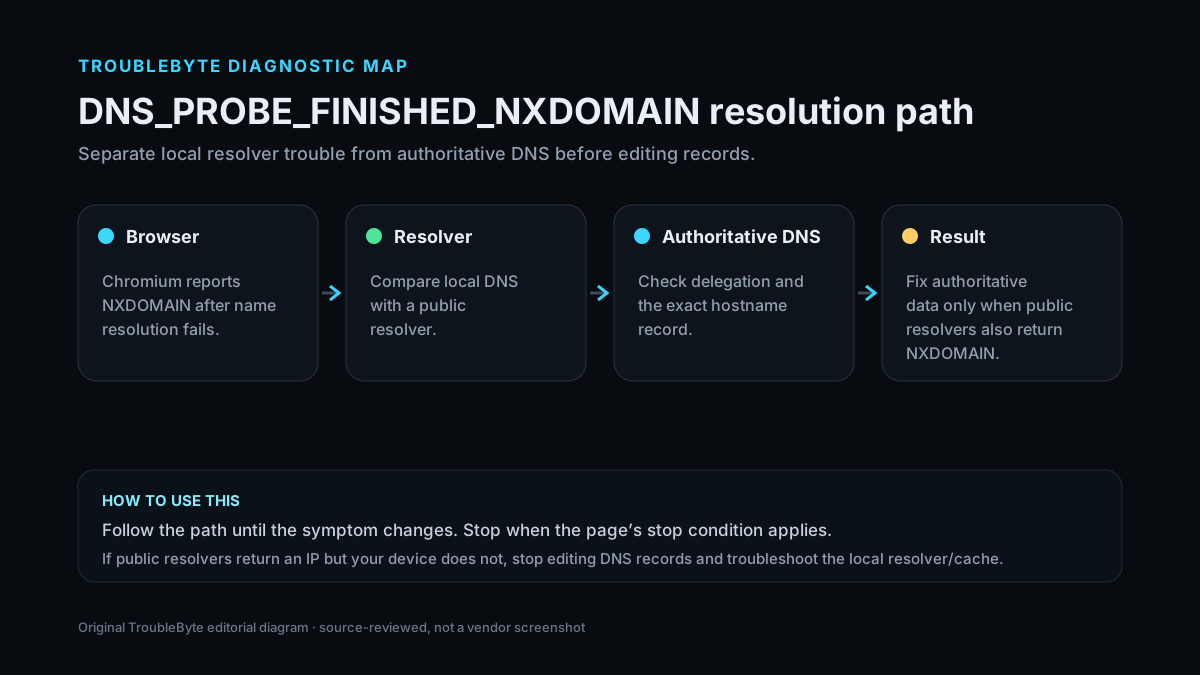
Inspect this hostname in public DNS
Check A, AAAA, CNAME, MX, NS and TXT records before changing DNS again.
TroubleByte diagnostic path
Confirm the exact failing apex or subdomain.
Check whether that exact name has a valid record.
Verify the record points to the intended origin or tunnel.
If NXDOMAIN persists, verify nameservers and zone status.
Original TroubleByte diagnostic map. It summarizes the cited troubleshooting order; it is not a vendor screenshot.
Use the symptom to choose the next branch
Do public or authoritative DNS lookups also return NXDOMAIN for the exact hostname?
Treat this as authoritative DNS/delegation work: verify the exact record, zone and nameservers.
Stop editing authoritative DNS; the problem is more likely local resolver, cache, device or network specific.
Is the failing name a subdomain such as www rather than the apex?
Verify that exact subdomain has its own intended record or alias. Do not assume the apex record covers it.
Verify the apex record and domain delegation before changing the web server.
Original TroubleByte decision aid derived from the cited troubleshooting scope. It does not replace vendor documentation.
What this usually means
The exact DNS_PROBE_FINISHED_NXDOMAIN string is associated with Chromium-family browser diagnostics. Other browsers can report the same underlying DNS failure with different wording. The key question is whether the hostname is actually absent from public DNS or only failing for one client or network; a site-owner fix is different from visitor-side resolver troubleshooting.
What we verified from the source material
Cloudflare defines NXDOMAIN as a DNS result indicating that the requested name does not exist and recommends checking the exact apex or subdomain record and its target. Cloudflare also notes that visitors can see similar browser symptoms because of local network or resolver issues, so this page separates site-owner DNS checks from visitor-side troubleshooting. Cloudflare’s DNS-record documentation also confirms the record types and TTL behavior used when correcting a missing or incorrect hostname record.
Prerequisites and checks
Prepare first
- Write down the exact failing hostname, including whether it contains www or another subdomain.
- If you own the domain, identify the authoritative DNS provider before editing records.
- Do not change the origin web server until public DNS resolution has been checked.
Checks that prevent the wrong fix
- Check the exact hostname in the error; www.example.com and example.com are different DNS names.
- If you just changed DNS, allow for propagation and resolver cache timing.
- Do not change origin web-server settings until you confirm DNS resolves to the intended target.
Applies to
Solutions, in order
Verify the exact apex or subdomain DNS record
- Identify the exact hostname that returns NXDOMAIN.
- Open the authoritative DNS zone for the domain.
- Confirm that the apex or subdomain has the expected A, AAAA, CNAME or provider-specific record.
- Correct the missing or wrong record and retest after DNS caches update.
Why this can work: Cloudflare defines NXDOMAIN as a resolver result that the name does not exist and recommends checking expected apex and subdomain DNS records.
Confirm the DNS record points to the intended target
- Review the value of the DNS record that exists.
- Confirm it points to the current origin IP, tunnel target or canonical hostname expected by your setup.
- Correct stale targets if necessary.
- Retest with an authoritative or public DNS lookup.
Why this can work: Cloudflare specifically recommends checking that existing DNS records point to the correct origin when the records are present.
How to know the fix actually worked
- Query the exact hostname from at least one public resolver and confirm it returns the intended record instead of NXDOMAIN.
- Test both the apex and the affected subdomain when both are supposed to exist.
- After a DNS change, retest after the configured TTL/cache window rather than making multiple rapid edits.
Do not count a temporary disappearance of the symptom as a confirmed fix if the problem normally returns after a restart, reconnect or several minutes of use.
When not to keep changing things
- If authoritative nameservers themselves return NXDOMAIN for a record that exists in the dashboard, verify domain delegation and zone status with the DNS provider or registrar.
- If only one device or network fails while public resolvers return the correct answer, stop editing authoritative DNS and troubleshoot the local resolver/network instead.
Escalation: If the correct DNS record exists but authoritative lookups still return NXDOMAIN, verify the domain’s delegated nameservers and zone status with the DNS provider or registrar.
Sources used for this record
Primary · checked Sep 6, 2026Cloudflare — Fix DNS_PROBE_FINISHED_NXDOMAINOfficial documentation used to verify the troubleshooting steps.Corroborating · checked Sep 6, 2026Cloudflare — Manage DNS recordsOfficial Cloudflare documentation for creating and correcting A, AAAA and CNAME records and understanding TTL behavior.Need private help with this guide?
If the guide did not resolve the problem, send a private case to TroubleByte. It is separate from the public discussion below.
Discuss this exact problem
Share what happened on your system, ask a focused follow-up question, or add evidence that may help someone with the same symptom. Community posts are separate from TroubleByte editorial verification.
Start a discussion
Revision history
Show 7 recorded revisions
2026-09-06 — v0.6 media/performance pass: added a dedicated social preview card and an original diagnostic diagram; indexing remains disabled.
2026-09-06 — v0.5 UX/discovery pass: added decision-oriented diagnostic guidance and kept indexing disabled.
2026-09-06 — v0.4 depth pass: added symptom framing, prerequisites, verification checks and explicit stop conditions; indexing remains disabled.
2026-09-06 — v0.3 trust pass: assigned a named human author/source reviewer, added section taxonomy and an original diagnostic flow; indexing remains disabled.
2026-09-06 — Narrowed the exact browser-error scope to Chromium-family browsers and clarified that other browsers may show equivalent DNS failures with different wording.
2026-09-06 — Clarified source-review semantics and evidence scope; no hands-on hardware test is claimed.
2026-09-06 — Created from current Cloudflare DNS troubleshooting documentation; held noindex for review.